
Deploying AI/ML Models in Kubernetes using Seldon Core, Istio and MetalLB
How can organizations leverage Seldon Core and Kubernetes to deploy, manage, and scale machine learning models effectively and efficiently? What steps and considerations are necessary for deploying multiple versions of machine learning models, developed in various languages and frameworks, within a Kubernetes environment using Seldon Core? How can Seldon Core, integrated with Kubernetes, ensure optimal model performance, seamless scalability, and effective monitoring at scale?
1. Seldon Core Overview
Seldon Core is an open-source platform that helps data scientists and engineers deploy, scale, monitor, and manage machine learning models in Kubernetes. It is designed to wrap machine learning models and expose them as services that can be readily consumed by other applications.
Seldon Core offers a set of tools to build a machine learning model pipeline that can include feature extraction, outlier detection, model prediction, and many other components. It also provides the ability to deploy these pipelines in a distributed fashion and manage them using a unified interface. Seldon Core follows the Kubernetes philosophy of declarative definitions for all components.
Key features of Seldon Core include:
- Multiple language support: You can deploy models built in Python, R, Java, etc.
- Model versioning: Seldon Core can handle multiple versions of the same model for comparison or rollback purposes.
- Scalability: You can scale your deployments horizontally, as per the demand.
- Monitoring: Seldon Core provides tools to monitor your model’s performance and usage.
- Integration with popular ML libraries and frameworks: Supports various ML libraries including TensorFlow, PyTorch, XGBoost, and many more.
NOTE: In this blog post we are using a Baremetal Server with a CentOS 9 Stream OS and 64GB of RAM with 8 vCPUs (no GPU installed).
2. Install K8s Cluster using KIND
Kind (Kubernetes in Docker) is a tool that allows you to create local Kubernetes clusters using Docker containers. It provides an environment to run Kubernetes clusters for development, testing, and experimentation purposes.
The benefits of using Kind include easy setup and teardown of clusters, fast cluster creation, and the ability to simulate multi-node Kubernetes clusters on a single machine. It helps streamline the development and testing workflow by providing a lightweight and isolated environment that closely resembles a production Kubernetes cluster.
- Install Docker and ensure that the Docker service is enabled and running:
sudo dnf config-manager --add-repo=https://download.docker.com/linux/centos/docker-ce.repo
sudo dnf install docker-ce --nobest
sudo systemctl enable --now docker
NOTE: also Podman can be used, but for certain parts of this blog post, Docker worked out of the box without further tweaks in KIND.
- Create a Kind K8s cluster to deploy Seldon Core:
CLUSTER_NAME="seldon"
cat <<EOF | kind create cluster --name $CLUSTER_NAME --wait 200s --config=-
kind: Cluster
apiVersion: kind.x-k8s.io/v1alpha4
nodes:
- role: control-plane
  kubeadmConfigPatches:
  - |
    kind: InitConfiguration
    nodeRegistration:
      kubeletExtraArgs:
        node-labels: "ingress-ready=true"
  extraPortMappings:
  - containerPort: 80
    hostPort: 80
    protocol: TCP
  - containerPort: 443
    hostPort: 443
    protocol: TCP
EOF
kubectl cluster-info --context kind-seldon
3. Installing K8s Ingress Controller
Kubernetes Ingress is crucial for managing external access to services within a cluster, providing routing and load balancing capabilities. Nginx Ingress, as a popular Ingress controller, enables seamless traffic distribution, SSL termination, and routing based on hostnames or paths, enhancing scalability and security.
- Install the Ingress Nginx adapted for Kind:
kubectl apply -f https://raw.githubusercontent.com/kubernetes/ingress-nginx/master/deploy/static/provider/kind/deploy.yaml
The provided command installs Nginx Ingress, extending Kubernetes functionality by efficiently directing incoming external requests to appropriate services using defined rules and configurations. This optimizes resource utilization and simplifies external connectivity management.
4. MetalLB
Kubernetes lacks native support for network load balancers (LoadBalancer-type Services) in bare-metal clusters. The existing load balancer implementations in Kubernetes are essentially connectors to various IaaS platforms (GCP, AWS, Azure…). Because our setup doesn’t match these supported IaaS platforms, newly created LoadBalancers will indefinitely stay in a “pending” state.
Because of that, with our Baremetal K8s clusters we are left with two suboptimal options to direct user traffic to our apps in the K8s clusters: “NodePort” and “externalIPs” services. Both choices have notable drawbacks for production use, relegating Baremetal clusters to a secondary position in the Kubernetes ecosystem.
MetalLB seeks to rectify this situation by providing a network load balancer solution that seamlessly integrates with standard network equipment. This approach ensures that external services function as smoothly as possible on Baremetal clusters, addressing the existing imbalance.
4.1 Install MetalLB
- Since version 0.13.0, MetalLB is configured via CRs and the original way of configuring it via a ConfigMap based configuration is not working anymore:
kubectl apply -f https://raw.githubusercontent.com/metallb/metallb/v0.13.9/config/manifests/metallb-native.yaml
- Wait until the MetalLB pods (controller and speakers) are ready:
kubectl wait --namespace metallb-system \
                --for=condition=ready pod \
                --selector=app=metallb \
                --timeout=90s
4.2 Setup address pool used by MetalLB Load Balancers in KIND
With MetalLB, Layer 2 mode is the simplest for us to configure: in many cases, we don’t require any protocol-specific setup, only IP addresses.
In our Layer 2 mode, we don’t need the IPs to be tied to our worker nodes’ network interfaces. The system operates by directly responding to ARP requests on our local network, furnishing clients with the machine’s MAC address.
- To finalize the layer2 setup, we must provide MetalLB with a designated IP address range under its control. Our intention is for this range to be within the Docker Kind network:
docker network inspect -f '' kind
NOTE: When using Docker on Linux (or KIND), it’s possible to route traffic directly to the external IP of the load balancer, given that the IP range falls within the Docker IP space.
- The result will include a CIDR, like 172.19.0.0/16. Our aim is to allocate load balancer IP addresses from this specific subset. We can set up MetalLB, for example, to utilize the range from 172.19.255.200 to 172.19.255.250. This involves establishing an IPAddressPool and the associated L2Advertisement:
kubectl apply -f - << END
apiVersion: metallb.io/v1beta1
kind: IPAddressPool
metadata:
  name: example
  namespace: metallb-system
spec:
  addresses:
  - 172.18.255.200-172.18.255.250
END
- To promote the IP originating from an IPAddressPool, an L2Advertisement instance needs to be linked with the respective IPAddressPool:
kubectl apply -f - << END
apiVersion: metallb.io/v1beta1
kind: L2Advertisement
metadata:
  name: empty
  namespace: metallb-system
END
Setting no IPAddressPool selector in an L2Advertisement instance is interpreted as that instance being associated with all the available IPAddressPools.
4.3 Testing the MetalLB deployment
- To test our setup, we will deploy a dummy app and check if we can use the K8s LoadBalancer powered by MetalLB to access our app:
kubectl apply -f https://kind.sigs.k8s.io/examples/loadbalancer/usage.yaml
LB_IP=$(kubectl get svc/foo-service -o=jsonpath='{.status.loadBalancer.ingress[0].ip}')
curl ${LB_IP}:5678
5. ServiceMesh and Istio
A Service Mesh is an infrastructure layer added to modern distributed microservices applications, enhancing them with transparent capabilities like observability, traffic management, and security. It simplifies complex operational needs such as A/B testing, canary deployments, and access control.
Istio is an open source service mesh solution that seamlessly integrates with existing distributed applications. It provides centralized features like secure communication, load balancing, traffic control, access policies, and automatic metrics. Istio is adaptable, supporting Kubernetes deployments and extending to other clusters or endpoints.
Its control plane offers TLS encryption, strong authentication, load balancing, and fine-grained traffic control. Istio’s ecosystem includes diverse contributors, partners, and integrations, making it versatile for various use cases.
We need Istio in order to deploy Seldon Core because it uses some functionality under the hood to deploy the ML models.
Let’s install Istio in Kind!
5.1 Install Istio in KIND
- Download and install Istioctl latest version:
curl -L https://istio.io/downloadIstio | sh -
cd istio-1.17.2
chmod u+x istioctl
cp -pr istioctl /usr/local/bin/
- Install Istio in our K8s cluster using istioctl:
istioctl install --set profile=demo -y

kubectl get service -n istio-system istio-ingressgateway
- Deploy the Bookinfo application to test the Service Mesh:
kubectl apply -f https://raw.githubusercontent.com/istio/istio/release-1.17/samples/bookinfo/platform/kube/bookinfo.yaml

kubectl apply -f https://raw.githubusercontent.com/istio/istio/release-1.17/samples/bookinfo/networking/bookinfo-gateway.yaml
- Retrieve and export the IP address of the Istio Ingress Gateway and the associated ports for HTTP and HTTPS services from the Kubernetes cluster’s Istio system namespace:
export INGRESS_HOST=$(kubectl -n istio-system get service istio-ingressgateway -o jsonpath='{.status.loadBalancer.ingress[0].ip}')
export INGRESS_PORT=$(kubectl -n istio-system get service istio-ingressgateway -o jsonpath='{.spec.ports[?(@.name=="http2")].port}')
export SECURE_INGRESS_PORT=$(kubectl -n istio-system get service istio-ingressgateway -o jsonpath='{.spec.ports[?(@.name=="https")].port}')
- Test the Bookinfo ProductPage app using the Istio Ingress Gateway:
export GATEWAY_URL=$INGRESS_HOST:$INGRESS_PORT
curl -I http://$GATEWAY_URL/productpage
6. Seldon Core
Seldon Core converts your machine learning models (like TensorFlow, PyTorch, H2O, etc.) or language wrappers (Python, Java, etc.) into operational microservices for production, which use REST/gRPC.
Seldon takes care of expanding to numerous production-level machine learning models and offers advanced machine learning features right from the start. This includes advanced metrics, keeping track of requests, explanation tools, spotting outliers, A/B testing, canary deployments, and more.
6.1 Seldon Core install
- Install the Seldon Controller using Helm to manage your Seldon Deployment graphs:
kubectl create namespace seldon-system
helm install seldon-core seldon-core-operator \
    --repo https://storage.googleapis.com/seldon-charts \
    --set usageMetrics.enabled=true \
    --set istio.enabled=true \
    --namespace seldon-system
NOTE: seldon-system namespace is preferred and we are using the istio enabled because we will use Istio alongside Seldon to expose our models to the final users.
- Define the Istio Ingress Gateway for Seldon Core:
kubectl apply -f - << END
apiVersion: networking.istio.io/v1alpha3
kind: Gateway
metadata:
  name: seldon-gateway
  namespace: istio-system
spec:
  selector:
    istio: ingressgateway # use istio default controller
  servers:
  - port:
      number: 80
      name: http
      protocol: HTTP
    hosts:
    - "*"
END
NOTE: this is just for a PoC, in production please use HTTPS/TLS instead of plain HTTP!
6.2 Seldon Core Workflow
Once we have installed Seldon Core, we can productize our model with the following three steps:
- Wrap our model using our prepackaged inference servers or language wrappers
- Define and deploy the Seldon Core inference graph
- Send predictions and monitor performance
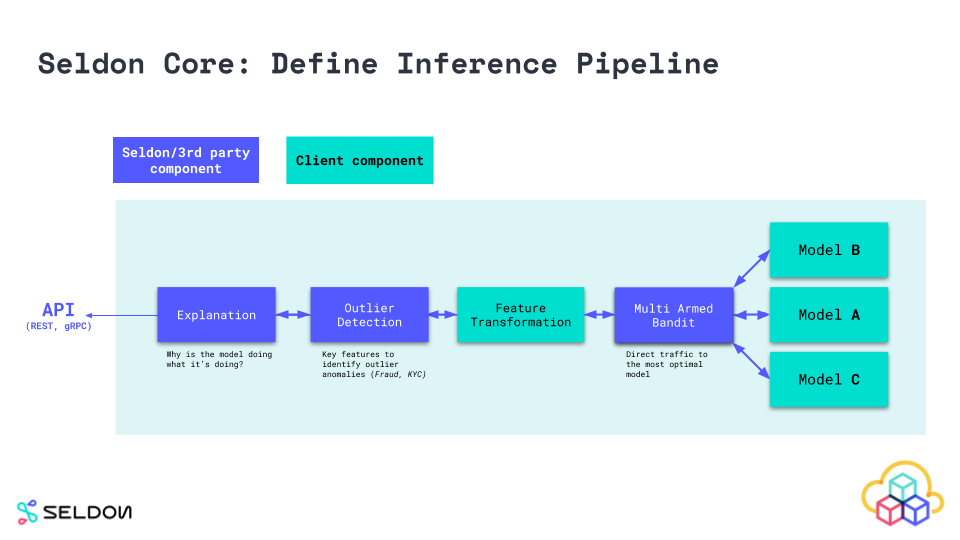 Source - Seldon Core Inference Pipeline Documentation
6.2.1 Wrap our model using our prepackaged inference servers or language wrappers
To prepare components for production, we need to package them as Linux containers following the Seldon microservice API guidelines. These encompass prediction-serving models, decision-making routers like A-B Tests, response-combining Combiners, and versatile transformers for request/response modification.
To simplify the integration of machine learning components developed in diverse languages and toolkits, Seldon Core offers wrappers. These enable effortless creation of Docker containers from our code, suitable for execution within Seldon Core. The presently recommended tool for this purpose is Red Hat’s Source-to-Image.
6.2.2 Define and deploy the Seldon Core inference graph
Deploying our models using Seldon Core is simplified through Seldon pre-packaged inference servers and language wrappers, or by building our own Seldon Inference Graphs.
In this case we will use the Seldon prebuilt Sklearn Server, but there are many more prebuilt servers such as TensorFlow, Hugging Face, and other Seldon Inference Servers.
We can deploy our model by loading the binaries/artifacts using the pre-packaged model server of our choice. We can also build complex inference graphs that use multiple components for inference if needed.
To run our machine learning graph on Kubernetes we need to define how the components we created in the last step fit together to represent a service graph. This is defined inside a SeldonDeployment Kubernetes Custom resource.
- Let’s generate a SeldonDeployment in our Kubernetes cluster to deploy an example of the Sklearn Iris Model example, using the SKlearn Inference Server:
kubectl create namespace seldon

kubectl apply -f - << END
apiVersion: machinelearning.seldon.io/v1
kind: SeldonDeployment
metadata:
  name: iris-model
  namespace: seldon
spec:
  name: iris
  predictors:
  - graph:
      implementation: SKLEARN_SERVER
      modelUri: gs://seldon-models/v1.17.0-dev/sklearn/iris
      name: classifier
    name: default
    replicas: 1
END
6.2.3 Send a request to our Machine Learning model deployed using SeldonDeployment
Every deployed model exposes a standardized User Interface to send requests using the OpenAPI schema.
- Let’s send a request to our ML model deployed:
curl -X POST http://$GATEWAY_URL/seldon/seldon/iris-model/api/v1.0/predictions \
    -H 'Content-Type: application/json' \
    -d '{ "data": { "ndarray": [[5.964, 4.006, 2.081, 1.031]] } }'
The data includes a “data” field containing an array (ndarray) of inputs. In this case, a single set of input values is provided: [5.964, 4.006, 2.081, 1.031], representing features for making a prediction.
- We receive a response from our model inference API with the generated predictions:
{
   "meta" : {},
   "data" : {
      "names" : [
         "t:0",
         "t:1",
         "t:2"
      ],
      "ndarray" : [
         [
            0.000698519453116284,
            0.00366803903943576,
            0.995633441507448
         ]
      ]
   }
}
Now that we know how to use SeldonDeployment to deploy our Machine Learning models using Seldon’s prebuilt Inference Servers, we can test other Inference Servers such as TensorFlow Server.
7. Seldon TensorFlow MNIST Model
If we have a trained TensorFlow model, we can deploy it directly via REST or gRPC servers.
- Let’s deploy the Tensorflow MNIST Keras example with Tensorflow Server:
kubectl apply -f - << END
apiVersion: machinelearning.seldon.io/v1alpha2
kind: SeldonDeployment
metadata:
  name: tfserving
spec:
  name: mnist
  predictors:
  - graph:
      children: []
      implementation: TENSORFLOW_SERVER
      modelUri: gs://seldon-models/tfserving/mnist-model
      name: mnist-model
      parameters:
        - name: signature_name
          type: STRING
          value: predict_images
        - name: model_name
          type: STRING
          value: mnist-model
        - name: model_input
          type: STRING
          value: images
        - name: model_output
          type: STRING
          value: scores
    name: default
    replicas: 1
END
- We wait until the SeldonDeployment is up and running and ready to serve prediction requests:
kubectl rollout status deploy/$(kubectl get deploy -l seldon-deployment-id=tfserving -o jsonpath='{.items[0].metadata.name}')
- In this case, to test our deployed ML model, we will use the Seldon-Core Python libraries to request predictions. Let’s install the Python libraries on our system:
pip3 install setuptools-rust
pip3 install --upgrade pip
pip3 install seldon-core --ignore-installed PyYAML
- Once the libraries are installed, we can use the SeldonClient class to request a prediction from our deployed ML model Inference Server (exposed using the Istio Ingress Gateway):
from seldon_core.seldon_client import SeldonClient
sc = SeldonClient(deployment_name="tfserving", namespace="seldon")
r = sc.predict(gateway="istio", transport="rest", shape=(1, 784))
print(r)
assert r.success == True
- After that, our MNIST ML model Inference server answers with the predictions:
Success:True message:
Request:
meta {
}
data {
  tensor {
    shape: 1
    shape: 784
    values: 0.4689572966007861
    values: 0.9660213976358323
    values: 0.2439077409486442
    values: 0.8575884865204007
    values: 0.27970466773693103
...
And with that, this blog post about how to deploy Machine Learning Models using Seldon Core, MetalLB, and Istio in our KIND K8s clusters deployed on a Baremetal server comes to a close.
In upcoming blog posts we will analyze how we can deploy our ML models in an easy and scalable way in the cloud, using Seldon-Core, OpenShift, and OpenDataHub!
NOTE: Opinions expressed in this blog are my own and do not necessarily reflect that of the company I work for.
Happy MLOpsing!